


Features
– Powerful effect plugin for creating striking pixel animations
– Customize colors, pattern size, horizontal/vertical detail, & more
– 10 fully modular pixel pattern presets for a variety of styles
– Compatible with After Effects and Premiere Pro
Built for Failure, Made for Pros
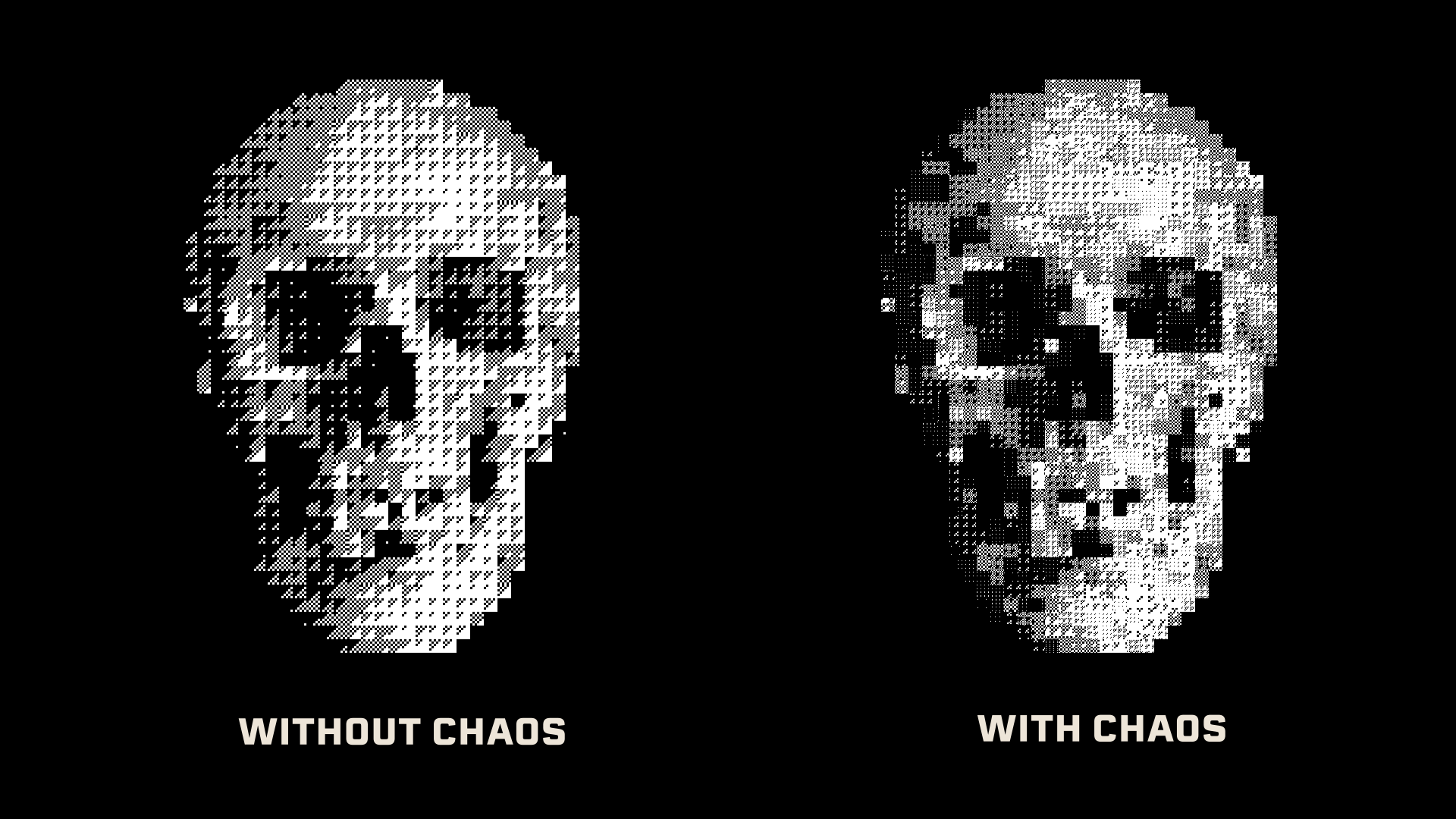
Get A Taste Of Chaos
Pixel_Encoder features an array of built-in "Chaos" controls designed to twist and corrupt your source images. Adjust intensity, behavior, animation speed, and more to create unique glitch effects.
Perfect for Layering
Just check the "Transparent Background" box and start creating layered pixel looks in no time. Great for digital mixed media and pixel asset pipelines.
Dial In Your Looks With Tone Detection
The new Tone Detection feature (available in Update 1.7) gives you five different ways to adjust how Pixel_Encoder interprets your source footage. These options are: Luminance [Rec.601], Average, Red Channel, Green Channel, and Blue Channel.
In most cases, switching between these various modes will provide slightly different versions of the same source image. It's a great way to "re-roll the dice" if you're not quite happy with what you're getting but don't want to make a major change to the vibe.
What Is Pixel_Encoder?
Pixel_Encoder is an effect plugin for Adobe After Effects and Premiere Pro. Apply it to any footage, and it converts the image into a grid of pixelated pattern tiles based on the brightness of the source. The output sits somewhere between ASCII art, mosaic graphics, and a hacked surveillance feed, ultimately taking on its own flavor of grungy digital texture.
10 Patterns & Full Control — Customize your image with 10 hand-crafted pixel patterns such as: High Detail, Numbers & Letters, Horizontal Lines, Dots, Vertical Lines, Extra Grunge, Rings, Solid, Diagonal (left), and Diagonal (right). Then, tweak your image further with convenient scale, brightness, and contrast controls.
Color Customization – Adjust the foreground and background colors of your visual output for quick control over your color palette. Or, check "Use Original Color" to sample pixel colors from your source image. Get even crazier and create layered pixel collages using the built-in transparent background setting.
Chaos Engine — Inject controlled chaos into any preset. Check the "Enable Chaos" box, and get access to Chaos Intensity, Random Seed, and Randomize Pattern, and other parameters that flip pixel values, scramble tile assignments, and break clean geometry into something organic.
Advanced Controls — Open up the Advanced control group to dial in your visuals with an array of precision tools that help you craft the perfect look. Achieve pixel-perfect alignment with the Pattern Offset X/Y value, fine tune your lighting with the shading detail slider, and more.
Requirements
SOFTWARE: Adobe Premiere Pro CS5+ or Adobe After Effects CS5+
HARDWARE: 2.4ghz processor or higher
MEMORY: 8gb RAM or higher (16+ recommended)
STORAGE: 7.81mb of available storage space
OS: Windows 7+ or MacOS 10.12+
Installs and activates with PATCH BAY, the free MEGAKRUNCH install manager. Get PATCH BAY